How to blacklist the internet
Here is a configuration that might meet your needs, to only allow, for example, WhatsApp and telegram but wanting to block everything else.
(A blacklist that you can upload into your blacklist to block 90% of the Internet domains.)
- Click here to download the csv file( this file you will upload to your portal)
- Log in to your LucidView MikroTik Portal
- Click on “View All” Enforcers
- Log in to the Enforcer you wish to block everything for.
- Go to your content filter
- Scroll down to Exception Manager
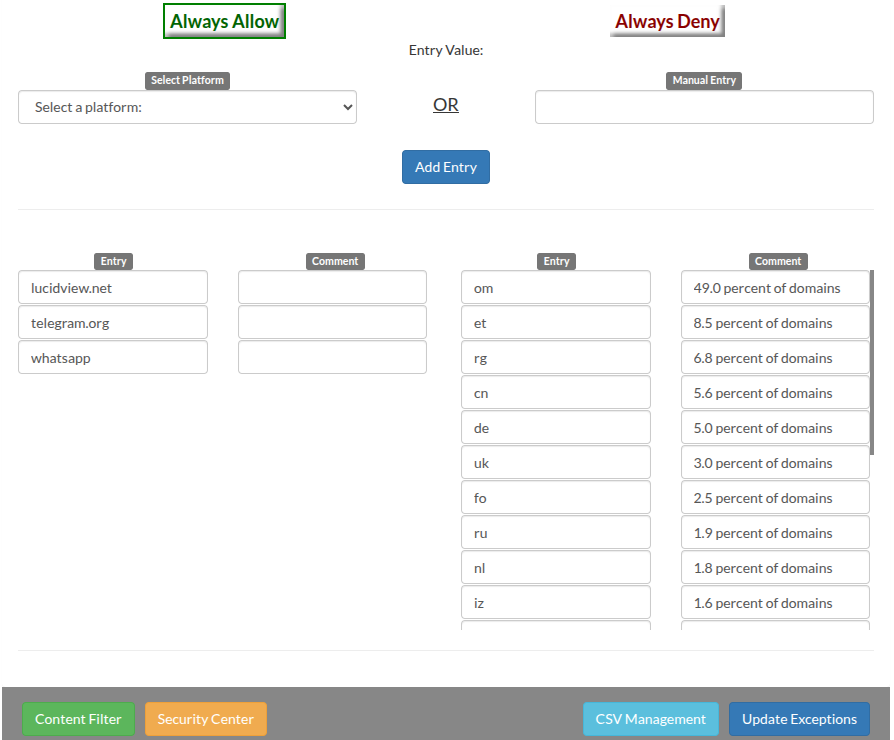
- Add WhatsApp, telegram and lucidvew.net to your whilelist,
- Click on Update exceptions.
- Click on CSV Management.
- Now you will upload the file that you downloaded under Select file:
- Then click on blacklist, and then click on upload.
- Click on Update exceptions.
This is what it should look like.